Automated Builds and Deployments w/ Forgejo
There are a few Self-Hosted Github like Repos/Registries, notably Gitea and Forgejo. They support Github Actions format CI/CD pipelines, mostly.
In my previous post I used AzureDevOps for a CI/CD pipeline. It turns out this isn’t very common and the platform has pretty much been neglected by MS.
Since I’ve worked with Forgejo a little before, I wanted to use it to create a simple automated build and deploy pipeline so people could see how easy it really is to get started. The code is available here: https://github.com/SkippySteve/ForgejoSelfHosting
Getting Started
First, create a VPS on your favorite public cloud provider w/ a public IP address. I initially started this on Azure, but my trial ran out so I moved it over to OVH to save some money. I’m using Debian 13. The Docker install is very straight forward and well documented on Docker’s site, but I do wish Debian included it in their repos.
Debian 13 doesn’t use a firewall by default. I recommend UFW for easy of use. You have to allow port 80 inbound if you want to use ACME for automatic certificate renewal, port 443 and 22 will be required as well. You could block port 22 inbound if you set up Tailscale, or something similar, for remote access, but that’s outside the scope of this guide. If you do leave port 22 open, be sure to lock down the SSH daemon config by only allowing public key authentication (no password authentication) and look into Fail2Ban.
Next, create some A records on your DNS provider pointing to the new VPS. I used ovh.mydomain.com and *.ovh.mydomain.com, where Forgejo is at forgejo.ovh.mydomain.com and the project I’m deploying is at capstone.ovh.mydomain.com.
Forgejo Compose
Everything is using the same Docker network, including the app we’re deploying.
We are not currently using Docker-In-Docker for the Forgejo Actions. This might be less secure. Feel free to send me instructions on getting Docker-In-Docker working if you’ve had success!
The comments on the commands for the runner need to be swapped for initial setup, register it according to Forgejo docs then switch the comments back to use it.
networks:
  caddy:
    external: true
    name: caddy

services:
  server:
    image: codeberg.org/forgejo/forgejo:14
    container_name: forgejo
    environment:
      - USER_UID=1000
      - USER_GID=1000
      - FORGEJO__database__DB_TYPE=postgres
      - FORGEJO__database__HOST=db:5432
      - FORGEJO__database__NAME=forgejo
      - FORGEJO__database__USER=forgejo
      - FORGEJO__database__PASSWD="YourSecurePass"
      - ROOT_URL=https://forgejo.yourdomain.com
      - FORGEJO__packages__ENABLED=true
      - FORGEJO__packages__CONTAINER__ENABLED=true
    restart: always
    networks:
      - caddy
    volumes:
      - ./server/data:/data
      - /etc/localtime:/etc/localtime:ro
    depends_on:
      - db

  db:
    image: postgres:14
    container_name: db
    restart: always
    environment:
      - POSTGRES_USER=forgejo
      - POSTGRES_PASSWORD="YourSecurePass"
      - POSTGRES_DB=forgejo
    networks:
      - caddy
    volumes:
      - ./postgres:/var/lib/postgresql/data

  runner:
    image: 'data.forgejo.org/forgejo/runner:12'
    container_name: runner
    networks:
      - caddy
    privileged: true
    user: root
    group_add:
      - 989
    volumes:
      - ./runner/data:/data
      - /run/docker.sock:/var/run/docker.sock
    restart: 'unless-stopped'
    #command: '/bin/sh -c "while : ; do sleep 1 ; done ;"'
    command: '/bin/sh -c "sleep 5; forgejo-runner daemon --config /data/config.yml"'
Forgejo Runner Config
The “group_add: 989” part came from the GID of the Docker user. This is the group owner of the Docker socket. It was a different number on two different Debian machines, so if your pipeline has permissions issues when accessing the socket, this would be good to check. It’s in both the Forgejo Compose and the Runner Config:
...
container:
  # Specifies the network to which the container will connect.
  # Could be host, bridge or the name of a custom network.
  # If it's empty, create a network automatically.
  network: "caddy"
  # Whether to use privileged mode or not when launching task containers (privileged mode is required for Docker-in-Docker).
  privileged: true
  # And other options to be used when the container is started (eg, --volume /etc/ssl/certs:/etc/ssl/certs:ro).
  options: "--group-add 989"
...
Caddy
Compose
networks:
  caddy:
    external: true
    name: caddy

services:
  caddy:
    image: caddy:2
    container_name: caddy
    restart: always
    networks:
      - caddy
    ports:
      - "80:80"
      - "443:443"
    volumes:
      - ./Caddyfile:/etc/caddy/Caddyfile:ro
      - ./data:/data
      - ./config:/config
Caddyfile
forgejo.yourdomain.com {
    reverse_proxy forgejo:3000 {
        header_up Host {host}
        header_up X-Real-IP {remote_host}
        header_up X-Forwarded-For {remote_host}
        header_up X-Forwarded-Proto {scheme}
    }
}
# Production
capstone.yourdomain.com {
    handle_path /api* {
        reverse_proxy capstone-api-prod:8000
    }
}

# Development
capstone-dev.yourdomain.com {
    handle_path /api* {
        reverse_proxy capstone-api-dev:8000
    }
}
Capstone API Compose
services:
  api-prod:
    image: forgejo.yourdomain.com/steve/capstone-backend:prod
    container_name: capstone-api-prod
    restart: always
    networks:
      - caddy
    environment:
      - ENV=production
      - OPENAI_API_KEY=${OPENAI_API_KEY}
      - OPENAI_API_URL=${OPENAI_API_URL}
      - PASSWORD=${PASSWORD}
      - ALGO=${ALGO}
      - RESEND_API_KEY=${RESEND_API_KEY}

  api-dev:
    image: forgejo.yourdomain.com/steve/capstone-backend:dev
    container_name: capstone-api-dev
    restart: always
    networks:
      - caddy
    environment:
      - ENV=development
      - OPENAI_API_KEY=${OPENAI_API_KEY}
      - OPENAI_API_URL=${OPENAI_API_URL}
      - PASSWORD=${PASSWORD}
      - ALGO=${ALGO}
      - RESEND_API_KEY=${RESEND_API_KEY}

networks:
  caddy:
    external: true
    name: caddy
Forgejo Actions Workflow
Everything is stored as Secrets in Forgejo, no need to write ENV variables to disk (outside the Postgres DB).
Finally, to make it all work, use this as an Actions template:
name: Build, Push and Deploy Image

on:
  push:
    branches:
      - main
      - dev

jobs:
  build:
    runs-on: ubuntu-latest
    env:
      REGISTRY: forgejo.yourdomain.com
      IMAGE_NAME: steve/capstone-backend
      REGISTRY_USERNAME: ${{ secrets.REGISTRY_USERNAME }}
      REGISTRY_PASSWORD: ${{ secrets.REGISTRY_PASSWORD }}
      OPENAI_API_KEY: ${{ secrets.OPENAI_API_KEY }}
      OPENAI_API_URL: ${{ secrets.OPENAI_API_URL }}
      PASSWORD: ${{ secrets.PASSWORD }}
      ALGO: ${{ secrets.ALGO }}
      RESEND_API_KEY: ${{ secrets.RESEND_API_KEY }}

    steps:
      - name: Checkout code
        uses: actions/checkout@v4
        with:
          repository: steve/capstone-backend
          fetch-depth: 0
          github-server-url: https://forgejo.yourdomain.com

      - name: Set Image Tag
        run: |
          if [ "${{ github.ref }}" == "refs/heads/main" ]; then
            echo "TAG=prod" >> $GITHUB_ENV
          else
            echo "TAG=dev" >> $GITHUB_ENV
          fi

      - name: Build Docker Image
        run: id; ls -la /var/run/docker.sock; docker build -t ${REGISTRY}/${IMAGE_NAME}:${TAG} .

      - name: Login to Registry
        run: echo "${REGISTRY_PASSWORD}" | docker login ${REGISTRY} -u ${REGISTRY_USERNAME} --password-stdin

      - name: Push Image
        run: docker push ${REGISTRY}/${IMAGE_NAME}:${TAG}

      - name: Deploy via SSH
        uses: https://github.com/appleboy/[email protected]
        with:
          host: ${{ secrets.SSH_HOST }}
          username: ${{ secrets.SSH_USER }}
          key: ${{ secrets.SSH_PRIVATE_KEY }}
          envs: OPENAI_API_KEY,OPENAI_API_URL,PASSWORD,ALGO,RESEND_API_KEY
          script: |
            # 1. Log the VM into the registry so it can pull
            echo "${{ secrets.REGISTRY_PASSWORD }}" | docker login ${{ env.REGISTRY }} -u ${{ secrets.REGISTRY_USERNAME }} --password-stdin

            cd /home/forgejo-deployment/capstone

            # Pull the specific image we just built
            docker compose pull api-${{ env.TAG }}

            OPENAI_API_KEY="$OPENAI_API_KEY" \
            OPENAI_API_URL="$OPENAI_API_URL" \
            PASSWORD="$PASSWORD" \
            ALGO="$ALGO" \
            RESEND_API_KEY="$RESEND_API_KEY" \
            TAG="${{ env.TAG }}" \
            docker compose up -d api-${{ env.TAG }}

            # Clean up old images to save disk space
            docker image prune -f
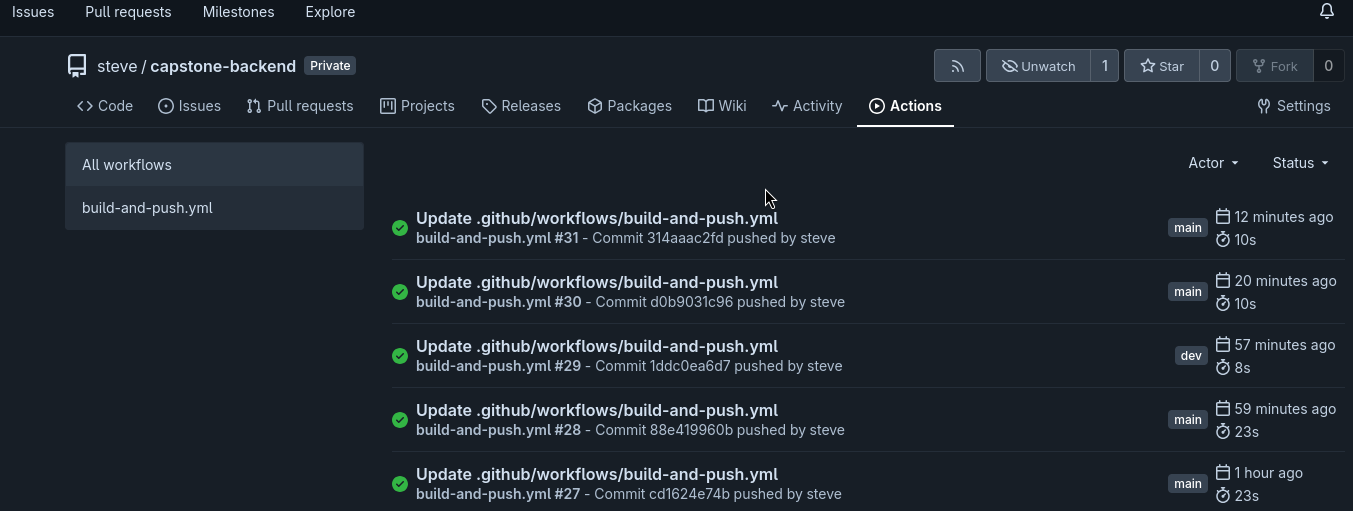
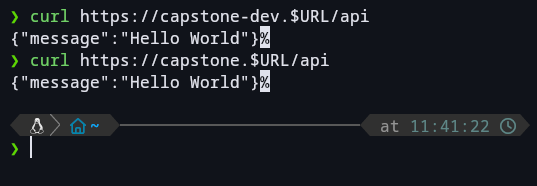
Success!!!